Organize Your T-Shirt Business with This All-in-One Tracker
Running a custom apparel business means juggling orders, tracking inventory, managing customer details, and staying on top of finances. It's a lot to handle, especially when you're focused on the creative side of designing and printing. That's where a solid organizational system becomes your best friend. Instead of cobbling together spreadsheets and scattered notes, imagine having a cohesive set of tools designed specifically for your workflow. A dedicated T-Shirt Order Form - Business Tracker bundle does exactly that, providing a structured yet flexible foundation for your operations.
More Than Just an Order Form
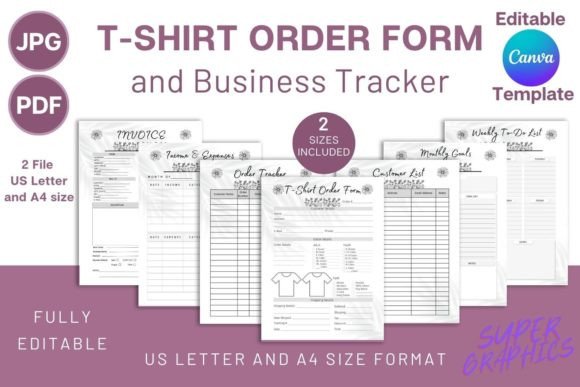
At its core, this bundle includes a clean, professional t-shirt order form. This is where you capture the essential details: customer name, contact information, garment style, size, color, print location, and design file references. But the real value extends far beyond that single sheet. The package is built as a comprehensive business tracker, meaning it includes companion documents that work together seamlessly. You get an order tracker to monitor the status of every job from receipt to delivery, a customer list to build your client database, and a weekly to-do list and monthly goals sheet to keep your projects on schedule.
Financial oversight is integrated directly into the system with an income & expenses tracker. This allows you to see at a glance where your money is coming from and where it's going, which is crucial for pricing your products correctly and understanding your profit margins. To complete the professional cycle, a customizable invoice template is included. You can generate consistent, branded invoices for every order, which not only looks professional but also simplifies your accounting. All these elements share a unified visual style, creating a professional impression whether you're viewing them on screen or printing them for your studio wall.
Creative Flexibility in Canva
What makes this particular system stand out is its delivery as a fully editable Canva template. Canva is a tool many creatives already use for social media graphics, presentations, and basic design work. By providing the source file in Canva, the bundle empowers you to make it truly yours without needing advanced design software. You can easily customize every aspect to match your brand identity. Change the fonts to ones that reflect your style, adjust the color palette to your brand colors, and add your logo to every page.
The flexibility goes deeper. You can add lines, checkboxes, squares, or any other design elements to tailor the forms to your specific process. Perhaps you need an extra field for a special printing technique or a checkbox for rush orders. You can modify the layout to suit how you work. This level of customization transforms a generic template into a personalized business tool. The bundle comes in both A4 and Letter size, ensuring it prints perfectly no matter where you are. Files are provided in both PDF and JPEG formats, with the PDF containing the direct Canva link for easy access.
Practical Applications for Your Brand
Using a coordinated set of business documents has a subtle but powerful effect on how clients perceive you. When you send a professional invoice that matches the design of your order form, it reinforces your attention to detail. It shows you run an organized operation, which builds trust. This consistency is a key part of brand perception. You're not just a printer; you're a professional business.
Internally, the benefits are just as significant. The order tracker and customer list become your central hub. No more digging through emails to find a size specification or a client's phone number. Everything is in one place, streamlining your workflow from order intake to final delivery. The weekly to-do list and monthly goals help you plan production batches, schedule design time, and set targets for growth. For a small business owner or a side-hustle crafter, this kind of structure is invaluable for turning a passion into a sustainable operation.
Getting Started and Making It Work for You
The process is straightforward. After purchase, you download the file and click the included Canva link. A best practice is to make a copy of the template in your Canva account right away. This preserves the original, so you can always start fresh or duplicate specific pages—like creating a new order form for a different product line—without affecting your master template. You can use the template repeatedly to generate all the printable documents you need.
When customizing, think about the readability and visual hierarchy of your forms. Use a clear, legible sans serif font for the main body text where you'll be filling in details. You might pair it with a more distinctive display font or a handwritten font for headings to inject some personality, as long as it remains professional. The goal is to create documents that are easy to read at a glance, both for you and for any clients who might see the order form.
Consider the practical aspects of printing. If you plan to print these forms in your studio, ensure the design isn't too ink-heavy. If you're sending the order form digitally as a PDF, make sure all the interactive fields or blank spaces are clearly defined. The included sizes cover most standard needs, but you can always adjust the dimensions in Canva if you have a unique requirement. This bundle isn't a rigid system; it's a starting point designed to adapt to the way you actually work, helping you maintain a professional edge while you focus on creating great custom t-shirts.